

Description
Product Overview
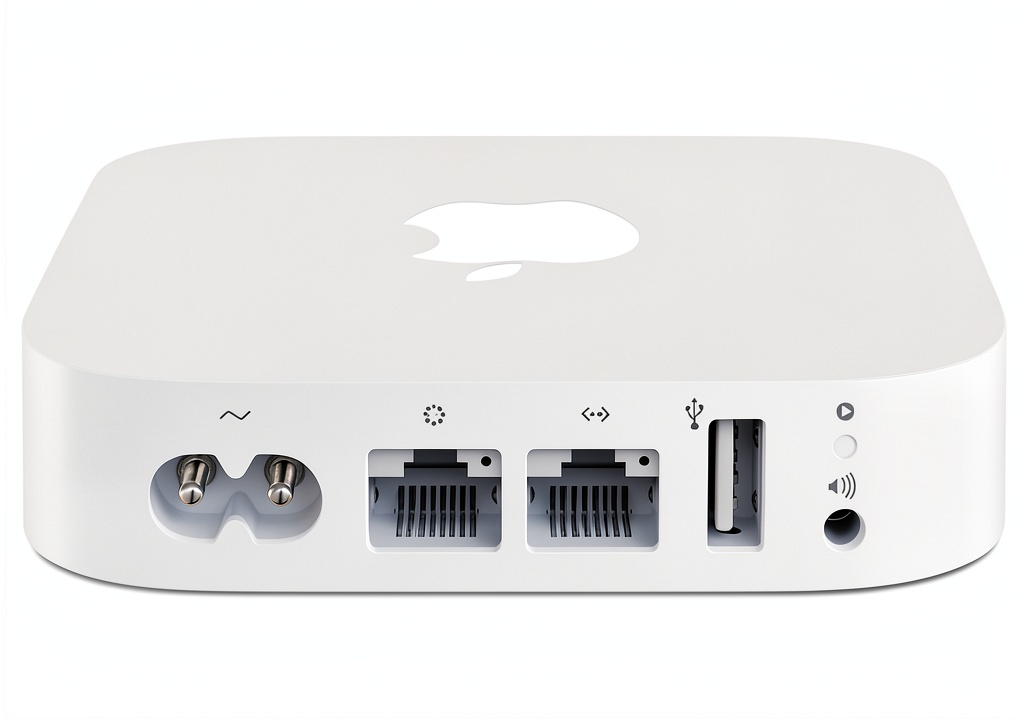
The Apple AirPort Express MC414LL/A is a compact, refurbished networking device that brings the reliability and ease of use associated with Apple products to any small office or home environment. Housed in a sleek white plastic enclosure, the unit measures just 9.02 x 7.28 x 1.85 inches and weighs a lightweight 10.8 ounces, making it easy to place on a desk, shelf, or even mount on a wall. Inside, the router combines a dual‑band 802.11n Wi‑Fi radio with a built‑in USB port, allowing you to connect a printer or external storage device without the need for additional hardware. The device supports both the 2.4 GHz and 5 GHz bands, automatically steering each client to the optimal frequency for maximum throughput and minimal interference.
Apple’s refurbishment process includes a full diagnostic test, replacement of any defective components, and a thorough cleaning to ensure the product looks and works like new. The AirPort Express also retains its original firmware, which integrates seamlessly with macOS and iOS devices. Setup is performed through the AirPort Utility app, available on iPhone, iPad, Mac, and even Windows computers, guiding users through a step‑by‑step wizard that configures the network, security settings, and printer sharing in just a few taps. The router supports WPA2 encryption, guest networking, and basic parental controls, providing a secure and flexible wireless environment for families and small businesses alike.
![[Product front view showing all components]](https://www.clickdomains.store/wp-content/uploads/2026/06/8595c874b90c49159eb28b69a4235209.jpg)
Usage
Designed for versatility, the AirPort Express fits naturally into a variety of usage scenarios. In a home setting, it can serve as the primary Wi‑Fi hub for streaming video, online gaming, video conferencing, and smart‑home device connectivity. Its dual‑band capability ensures that bandwidth‑intensive tasks such as 4K video streaming occur on the less‑congested 5 GHz band, while lower‑priority devices like smart thermostats and voice assistants remain on the 2.4 GHz band. The built‑in USB port turns any compatible printer into a wireless printer, eliminating the need for a separate print server and allowing users to print from any device on the network, including iPhones, iPads, Macs, and Windows PCs.
For small office environments, the AirPort Express provides a cost‑effective solution for creating a secure guest network, separating visitor traffic from internal business communications. The device’s compact size means it can be discreetly placed in a conference room or reception area, delivering reliable coverage without cluttering the workspace. Professionals who travel frequently will appreciate the ease of setting up a new network at a hotel or coworking space using the AirPort Utility app, which remembers previous configurations and can quickly re‑establish a secure connection.
Because the router is refurbished, it offers an environmentally friendly alternative to purchasing a brand‑new unit, reducing electronic waste while still delivering the performance expected from Apple‑branded networking equipment. Whether you are a student setting up a dorm room, a family looking to share a single printer, or a remote worker needing a stable home office connection, the AirPort Express adapts to your needs with minimal configuration effort.
Why Choose Us
Choosing a refurbished Apple AirPort Express from a reputable seller provides several distinct advantages over buying a new, generic router. First, the product undergoes a rigorous testing and certification process that verifies every component functions to Apple’s original specifications. Any defective parts are replaced with genuine Apple components, ensuring longevity and consistent performance. Second, the refurbished status translates into a lower price point—approximately $84.99—while still delivering the same user experience as a brand‑new device.
Our commitment to quality extends beyond the refurbishment itself. Each unit is backed by a limited warranty that covers hardware defects for a specified period, and our customer support team is trained to assist with any setup or troubleshooting questions. We also provide detailed documentation, including the original Apple user guide and a quick‑start sheet that highlights the most common configuration steps. This level of after‑sales service helps customers feel confident in their purchase and reduces the time spent searching for solutions online.
In addition, the AirPort Express’s compatibility with Apple’s ecosystem means you can manage your network directly from your iPhone, iPad, or Mac without needing third‑party software. The AirPort Utility app offers a clean, intuitive interface that displays network status, connected devices, and performance metrics at a glance. For users who prefer a more hands‑on approach, the router also supports standard configuration via a web browser, giving you flexibility in how you manage your network.
Finally, the environmental impact of choosing a refurbished product cannot be overstated. By extending the life cycle of existing hardware, we help reduce the demand for new raw materials and the energy consumption associated with manufacturing. This aligns with growing consumer expectations for sustainable purchasing decisions, making the AirPort Express not only a smart technical choice but also a responsible one.
Key Features
- Dual‑band 802.11n Wi‑Fi delivers fast, stable connections for streaming, gaming, and work‑from‑home tasks.
- Built‑in USB port enables wireless printer sharing, turning any compatible printer into a network device.
- Simple, guided setup through the AirPort Utility app on iPhone, iPad, or Mac reduces configuration time.
- Compact, lightweight design fits easily on desks, shelves, or wall mounts without clutter.
- Comprehensive after‑sales support and limited warranty provide peace of mind and reliable assistance.
FAQ
Can I use the AirPort Express with a non‑Apple printer?
Yes. The USB port on the AirPort Express works with any printer that supports standard USB printing protocols. Once the printer is connected, it becomes available to all devices on the network, including Windows PCs, Android phones, and iOS devices.
How do I update the firmware on a refurbished AirPort Express?
The AirPort Express automatically checks for firmware updates when connected to the internet. If an update is available, the AirPort Utility app will prompt you to install it. You can also manually check for updates by opening the app, selecting your AirPort Express, and clicking the “Update” button.
Is the refurbished unit covered by a warranty?
All refurbished AirPort Express units sold by our store include a limited warranty that covers hardware defects for a period of 90 days from the date of purchase. If you encounter any issues, contact our support team for troubleshooting or replacement.
Can I create a guest network with this router?
Yes. The AirPort Utility app allows you to enable a guest network that isolates visitor traffic from your main network. This feature helps protect your personal files and devices while still providing internet access to guests.
What security protocols does the AirPort Express support?
The router supports WPA2 Personal encryption, which is the current industry standard for wireless security. It also offers WPA/WPA2 mixed mode for compatibility with older devices, and you can set a strong password during the initial setup to keep your network secure.
Reviews
There are no reviews yet.